
PAKFUN Game Download – Great Features and Tips for 2026
JUST NOW
11MB
1.1.0
ANDROID 5+
10000+

Description
Looking for reliable details on PAKFUN Game before you download anything? Many Android users hear about this APK through chat groups, yet few know what to verify first. This short introduction explains what the app is, why people search for it, and which installation steps deserve attention. If you also compare similar titles, our M333 Game guide offers a useful second look.
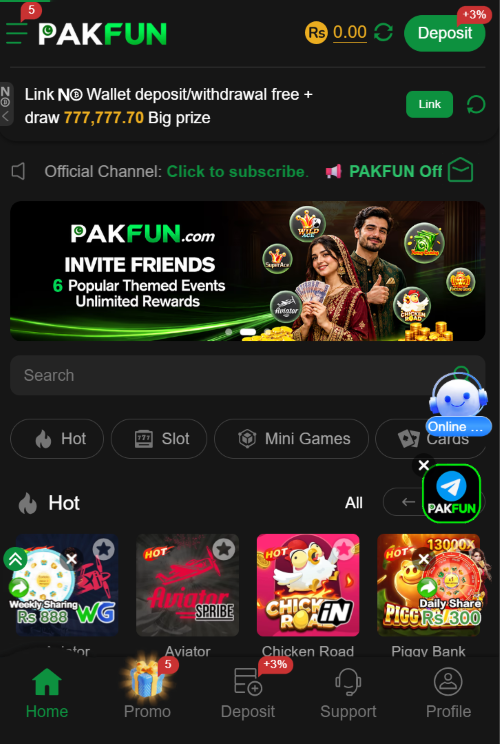
Whichever app you choose, a careful download source matters more than speed. Check the version, review permissions, and confirm your phone meets the Android requirements. PAKFUN Game can be understood before it reaches your device, and that habit protects your personal data. Another option is the MB666 Game.
What Exactly Is PAKFUN Game?
PAKFUN Game is described online as an Android application package that bundles several in-app game sections inside one download. People usually find it through third-party websites rather than Google Play, which is why verifying the source matters so much.
Why the App Name Gets Searched So Often
Short, catchy names travel fast on social media and messaging groups. Curiosity drives most searches, and many users simply want to know whether the file is genuine or a repackaged copy.
Think of it less as a single title and more as a launcher-style app that groups different activities under one icon. That structure explains the lightweight download, but it also means the experience depends heavily on which app version you receive. Two people can install files with the same name and end up with different content, so always compare what you see on screen with what the listing promised.
Snapshot of the App at a Glance
| Detail | Information |
| App Title | PAKFUN Game. |
| Type | Entertainment app. |
| Platform | Android. |
| File Format | APK. |
| Minimum OS | Android 5.0 or newer. |
| Typical Size | Changes per build number. |
| Interface Language | English. |
| Cost to Download | Free file, in-app options may vary. |
Core Functions Users Commonly Mention
Reports from users and listing pages point to a few recurring strengths:
- Clean navigation menu with clearly labelled sections
- Small installation footprint
- Quick launch time on mid-range phones
- Adjustable layout for different screen resolutions
- Periodic patch releases for bugs
- Basic account registration flow
- Notifications that can be switched off
- Smooth touch controls
- Stable frame rate during longer sessions
- Support for portrait orientation
Interface and Navigation Experience
The layout leans toward simple tiles and a bottom tab bar, so first-time users rarely get lost. Nothing here demands any real technical knowledge whatsoever.
Keep in mind that these points come from listing pages and user comments, not from an independent audit. A feature that works on one handset may stutter on another, and no website can promise identical behaviour everywhere. Test the basics for a few minutes after installing, such as login speed, menu response and sound settings, before spending time inside any section.
Why People Look for This App
Several practical reasons come up again and again:
- Convenient one-app access to varied sections
- Does not eat much internal storage
- Works on older budget handsets
- Fresh visual theme in recent builds
- Version updates that fix crash issues
- Easy to remove if you change your mind
Experience still varies with chipset, Android build and network quality.
Another quiet reason is word of mouth. Friends forward screenshots and short clips, and curiosity does the rest. That kind of viral sharing is also how fake copies spread, so a popular name is never proof that a file is safe.
Phone Requirements Before You Download
Checking your hardware first prevents most installation errors.
| Component | Suggested Level |
| Operating System | Android 6.0 or higher. |
| Memory | 3 GB RAM preferred. |
| Free Space | Around 150 MB. |
| Processor | Octa-core or equivalent. |
| Connection | Steady Wi-Fi or 4G. |
Storage and Memory Tips
Clearing cached files and closing background apps beforehand helps the installer finish without freezing.
Where to Get the APK Without Unnecessary Risk
Use a site that publishes version numbers, file hashes and a visible update date. If a page hides these, skip it. Compare the package size across two or three sources, because a big mismatch can signal a tampered file.
Steps worth following:
- Pick a reputable download portal.
- Confirm the listing shows the newest release version.
- Match the advertised file size with what your browser downloads.
- Wait until the download completes fully.
- Open your phone’s Downloads folder to find the file.
A useful trick is to search the developer name shown on the page and see whether it appears anywhere else with a consistent history. Pages created last week with no contact details, no privacy policy and dozens of pop-up ads deserve zero trust. If your browser warns about a harmful download, believe it and close the tab.
Installing PAKFUN Game on Your Phone
Android blocks outside installers by default, so a small permission change is needed. Here is the usual route:
- Open Settings and search for Install unknown apps.
- Grant permission to your browser or file manager.
- Tap the APK file.
- Press Install and let the package installer finish.
- Launch the app from your home screen.
Once you are done, turn the unknown sources permission back off. That single habit closes a door many people leave open for months.
Fixing an Install That Refuses to Finish
A parse error normally means the file is corrupted or the phone is too old. A storage warning means you need more free space. Re-downloading from a different mirror often solves the rest, and restarting the phone helps too. If the problem continues after two attempts, stop trying and consider that the APK file itself may be faulty or unsafe.
Some phones, especially newer Android versions, also display a Play Protect prompt during setup. Read it fully instead of dismissing it, because it may be flagging a genuine security concern. Choosing the scan option takes only a few seconds and gives you a second, independent opinion on the file before anything runs. If the scan reports a threat, delete the installer straight away and empty the Recycle or Trash folder.
Everyday Performance Expectations
On phones meeting the suggested specs, PAKFUN Game should open quickly and respond smoothly. Heat and battery drain rise on older devices during long sessions, so short breaks help. Keeping system updates current also improves app stability.
Network quality matters more than many people expect. A weak signal can cause long loading screens that look like app problems but are really connectivity issues. Switching from mobile data to a stable router connection often fixes lag instantly. Clearing the app’s cache once a month, and restarting the phone now and then, keeps memory usage under control. If PAKFUN Game keeps closing by itself, check whether your phone’s battery saver mode is killing background processes.
Safety Checklist for Sideloaded Apps
- Scan the file with trusted antivirus software
- Read every permission request carefully
- Refuse access to contacts or SMS if it seems unnecessary
- Avoid modded builds from unknown uploaders
- Never hand over passwords or one-time codes
- Keep a backup of important phone data
After installing, open Settings and review what the app can actually reach. Camera, microphone and location access are rarely needed for a simple game, so switch them off. Watch your data usage for the first few days as well, because unusual background traffic can reveal a problem early. Anyone sharing a phone with children should add a screen lock and keep sideloaded apps out of reach.
Legal and Responsible Use in Pakistan
Some apps in this category involve real-money wagering, and gambling is restricted under Pakistani law. Anyone considering such features should understand the legal position and the financial risk first. Treat any promise of guaranteed earnings as a warning sign, set a strict spending limit, and never use borrowed money. Users who feel they are losing control can talk to a trusted family member or a counselling service.
Deposits and Withdrawals: What to Verify
Apps in this space sometimes mention mobile wallets like JazzCash or EasyPaisa, but availability is never certain. Confirm it inside the app rather than trusting a listing page.
| Check | Why It Matters |
| Minimum limits | Avoids surprise rejections. |
| Processing time | Sets realistic expectations. |
| Account ownership | Prevents blocked transfers. |
| Fee disclosure | Reveals hidden costs. |
Protecting Your Wallet Details
Use only an account registered in your own name and keep transaction receipts. Never send money to a personal number supplied through chat, since that is a common scam pattern.
Screenshots of successful payouts posted in chat groups prove nothing, because they are trivially edited. Rely only on what you see in your own transaction history and wallet statement, and be suspicious of any request to pay a verification fee before a withdrawal. A legitimate service does not ask for that. If PAKFUN Game or any similar app behaves this way, stop using it and contact your mobile wallet provider to report the activity.
Privacy and Data Handling Basics
Every app that asks you to register collects something, usually a phone number, an email address or a device identifier. Before creating an account in PAKFUN Game, look for a written privacy policy that explains what is stored, how long it stays on servers, and whether it is shared with advertising partners. If no policy exists, treat that as a clear answer.
Smart Habits for Account Security
Create a unique password that you do not use for email or social media, and switch on two-step verification wherever it is offered. Avoid logging in through public Wi-Fi, since open networks make session hijacking easier. Finally, log out on shared phones and clear saved credentials from your browser.
Strengths and Weaknesses
| Advantages | Drawbacks |
| Quick setup | Needs unknown source permission. |
| Compact file size | Availability differs by website. |
| Works on many handsets | Older builds may lose support. |
| Straightforward layout | Results depend on device model. |
Keeping the App Updated
Updates arrive only when you fetch them, because there is no auto-update through a store. Visit the same trusted source, compare the version label, and install over the existing copy. Back up first if you care about saved progress.
Never accept an update prompt that opens a different website or asks you to re-enter payment details. Real updates simply replace the installed package. If the version number goes backwards, or the file name looks odd, stop and verify before continuing.
Alternatives Worth Considering
If the security risk worries you, look at titles on Google Play that offer casual gameplay with verified developers, public user reviews and clear privacy policies. Store apps are scanned regularly and removal is simple.
Also consider whether you need an app at all. Many browser-based games run with nothing installed, which removes sideloading risk completely. Spending ten minutes comparing options is far cheaper than recovering a hacked account later, and PAKFUN Game should earn your trust like any other app.
Final Thoughts on PAKFUN Game
PAKFUN Game is one of many sideloaded Android titles, and the smartest approach is cautious. Verify the download source, check your device compatibility, respect local rules, and guard your personal data. If anything about the file or its payment prompts feels off, uninstall it.
Before you close this page, take one practical step: write down the version number, the download source and the date you installed the file. If something goes wrong later, those notes make troubleshooting and reporting much easier. Share what you learned with friends who plan to try PAKFUN Game, because a careful community is the best defence against fake files. Remember too that a free download can still cost you through data theft, unwanted charges or wasted time, so patience is always cheaper than regret. Choose verified sources, keep your software current, and trust your instincts when an offer sounds too good to be true.
Good digital habits matter more than any single app. People who check sources, read permissions, and limit what they share rarely face serious trouble, even when they try unfamiliar software now and then. Build those routines once, and they will protect you across every future download, whether from a website or friend.
Frequently Asked Questions
Is PAKFUN Game made for Android only?
Listings mention Android devices only, and results depend on your OS version and phone specs.
Can I trust every APK page?
No. Rely on pages that show version details, checksums and recent update dates.
How do I update PAKFUN Game safely?
Download the latest build from the same verified site and install it over the old one.
Why does installation sometimes fail?
Common causes are low storage, an outdated Android version or a damaged download.

Download links
How to install PAKFUN Game Download – Great Features and Tips for 2026 APK?
1. Tap the downloaded PAKFUN Game Download – Great Features and Tips for 2026 APK file.
2. Touch install.
3. Follow the steps on the screen.