
JAN111 Game Great Features And Mobile Access Guide 2k26
JUST NOW
11MB
1.1.70
ANDROID 5+
10000+

Description
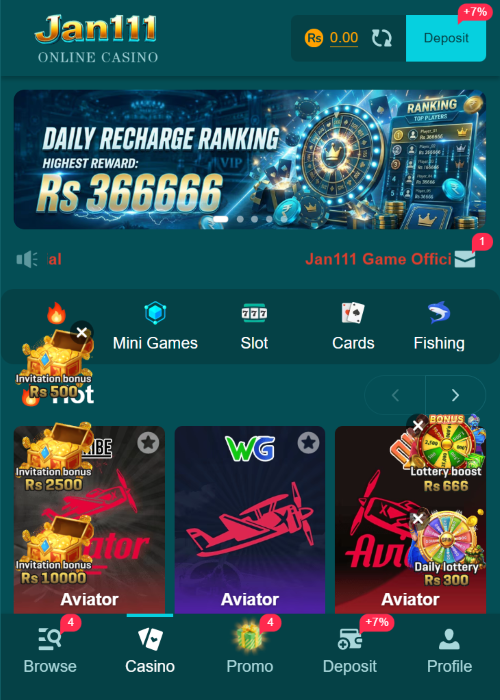
JAN111 Game is a mobile gaming platform designed for users who prefer exploring different online games through a simple and accessible interface. Its layout aims to make navigation easier, allowing players to browse available options and understand the basic features without unnecessary complexity. Before getting started, users should review the platform’s instructions, account requirements, and applicable terms.
Players interested in exploring more gaming options can also check A111 Game and 444HQ Game for additional choices. Comparing different platforms can help users understand their interfaces, available features, and account options before deciding which one suits their preferences. Always review the relevant rules and use online gaming platforms responsibly.
JAN111 Game Overview
| Feature | Details |
|---|---|
| Platform Name | JAN111 Game. |
| Category | Mobile Entertainment. |
| Application | Android APK, if available. |
| Version | Check Current Release. |
| File Size | Depends on Version. |
| Compatibility | Verify Android Requirements. |
| Developer | Confirm Official Publisher. |
| Registration | Subject to Platform Rules. |
| Language | Check Available Options. |
| Age Requirement | Adults Where Legally Permitted. |
These details are general reference points rather than confirmed specifications. Always compare the information with the actual publisher listing.
Main Features and JAN111 Game Highlights
Mobile applications are easier to understand when their important sections are properly organized. Users should examine practical functions instead of depending entirely on attractive advertisements. The following features describe useful areas to evaluate before using an unfamiliar entertainment service.
- Simple Interface: Clear menus and readable buttons.
- Mobile Navigation: Convenient access to different sections.
- Game Categories: Organized entertainment options.
- Account Settings: Accessible profile management.
- Visual Presentation: Understandable graphics and labels.
- Help Information: Useful instructions for visitors.
- Privacy Controls: Options for personal information.
- Update Details: Information about software changes.
- Security Options: Basic account protection facilities.
Actual availability should always be checked within the current release. A feature mentioned in an advertisement may not appear in every version or region.
Interface Design and Navigation
A mobile interface should help visitors find important information easily. Menus, account settings, and instructions should have clear labels. When exploring JAN111 Game, users should check whether sections are logically arranged and returning to the main screen is simple.
Readable text matters on smaller smartphone displays. Buttons should be recognizable, and instructions should remain visible. A confusing interface can make account management difficult for beginners.
Users should also check whether the platform explains its rules clearly. Attractive graphics alone cannot establish reliability. Transparent instructions, accessible settings, and clear policies are more useful indicators when evaluating an application.
How to Get Started In JAN111 Game
Before using any unfamiliar mobile service, visitors should verify its publisher and check the relevant installation information. The following table provides a general preparation sequence.
| Step | Action | Purpose |
|---|---|---|
| 1 | Verify Source. | Identify the genuine publisher. |
| 2 | Check Version. | Review release information. |
| 3 | Prepare Device. | Confirm available storage. |
| 4 | Inspect Permissions. | Avoid unnecessary access. |
| 5 | Install Carefully. | Follow verified instructions. |
| 6 | Read Conditions. | Understand platform rules. |
| 7 | Secure Account. | Protect personal credentials. |
| 8 | Explore Menus. | Learn available controls. |
Do not download a package simply because its title contains the latest year. Some websites imitate familiar designs to encourage visitors to install unrelated or modified files. Check the publisher details, website address, and download information before proceeding.
If the source cannot be verified, postpone installation. Avoid websites that use repeated redirects, confusing advertisements, or unusual requests for personal information.
Android Compatibility and Device Requirements
Compatibility with JAN111 Game depends on its software version and smartphone specifications. Check minimum operating system requirements before installation.
Available storage also matters. Limited space may cause installation errors or performance issues. Removing unnecessary files and closing unused applications can prepare the device.
A stable internet connection may be required for online features. Check mobile data and network quality before opening applications that connect to remote servers.
Important preparation points include:
- Update the Android operating system.
- Check available internal storage.
- Review the required permissions.
- Keep security protection enabled.
- Use a stable internet connection.
Never install modified system software to bypass compatibility restrictions. Unofficial packages can introduce security problems and affect other applications.
Registration and Account Management
Account registration for JAN111 Game should only be completed through a verified service. Before entering information, visitors should read the privacy policy and understand why particular details are requested. Avoid providing unnecessary personal information through unfamiliar websites or private messages.
If registration is available, follow the displayed instructions and review the account conditions. Use accurate information where required by the official rules. Do not create additional profiles if the service prohibits multiple accounts.
For better protection, follow these practices:
- Choose a unique password.
- Keep recovery details secure.
- Avoid sharing verification codes.
- Review account information regularly.
- Sign out from shared devices.
A secure account also requires attention to unexpected messages. Someone claiming to represent customer support should never need your existing password or private verification code.
Login Process and Account Access
The JAN111 Game login process requires registered credentials and a supported access method. First, confirm that you are visiting the genuine application or website. Similar-looking pages may collect sensitive information.
Enter the required details carefully and check for typing mistakes. If access fails, verify the username and login method before trying again. Avoid repeated password guesses because some services may temporarily restrict access after unsuccessful attempts.
If password recovery is available, follow the official procedure. Do not pay unknown individuals promising account access. Keep recovery information private and review active sessions if available.
Payment Information for Pakistani Users
Payment facilities can differ according to the region, operator, and current service conditions. Pakistani visitors should independently confirm whether JazzCash, Easypaisa, bank transfers, or other payment options are genuinely supported.
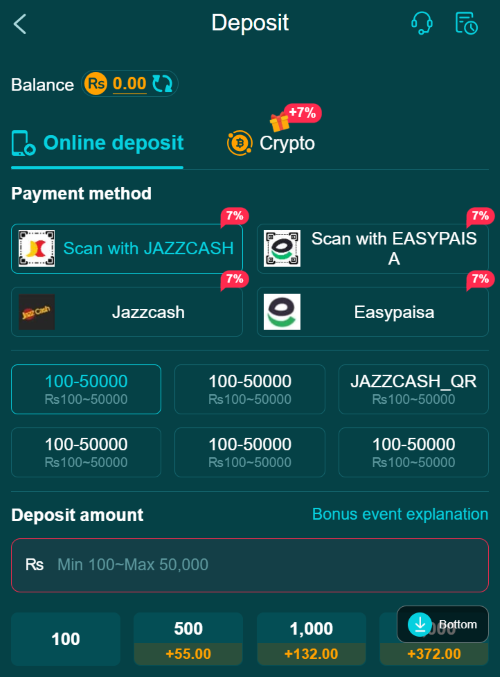
Never assume that a payment method is available simply because its logo appears on an advertisement. Check the actual payment conditions and verify the recipient information before making any transaction.
Useful payment precautions include:
- Confirm the recipient name.
- Check applicable transaction limits.
- Review possible service charges.
- Save every payment receipt.
- Avoid unfamiliar personal accounts.
- Verify pending transaction details.
Users should also consider the financial risks of casino-style entertainment. Never spend borrowed money or funds required for household expenses, education, healthcare, or other essential needs.
Withdrawal Information and Conditions
Before using the withdrawal feature of JAN111 Game, users should review the withdrawal conditions carefully. They need to understand the minimum amount, verification requirements, supported payment methods, and processing conditions.
A displayed account balance does not necessarily mean that the complete amount is immediately available. Certain services may apply additional requirements involving account verification or promotional credits.
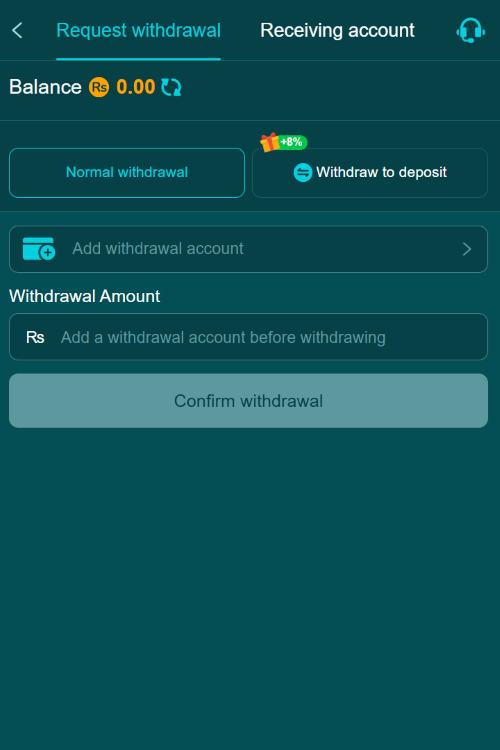
If a transaction remains pending, keep its reference number and check the published processing period. Contact the provider through a verified support channel if the expected time has passed.
Remember these precautions:
- Read withdrawal conditions carefully.
- Check minimum withdrawal limits.
- Keep transaction references available.
- Avoid unofficial processing charges.
- Never disclose account passwords.
Do not send additional payments to unknown individuals promising faster withdrawals. Unexplained charges and requests for verification codes should be treated as warning signs.
Advantages and Limitations
Every online platform has potential advantages and limitations. Users should consider both sides before deciding whether a service is appropriate for their needs.
Potential Advantages
- Mobile access on compatible devices.
- Organized sections for easier navigation.
- Readable information and instructions.
- Accessible account management options.
- Convenient viewing on smartphone screens.
- Written policies for important procedures.
Possible Limitations
- Regional availability may be restricted.
- Unverified APK files can create security risks.
- Internet access may be necessary.
- Payment conditions can involve restrictions.
- Older smartphones may experience difficulties.
- Casino-style activities can involve financial losses.
These points are general considerations rather than verified promises about every release. Check the actual application and its published conditions before relying on advertised benefits.
User Experience and Performance
A good mobile experience with JAN111 Game depends on navigation, loading speed, readability, and device compatibility. Users should check whether sections respond properly and important information remains accessible.
Performance varies between smartphones. Devices with limited memory may respond slowly when multiple applications run simultaneously. Closing background programs and maintaining sufficient storage can improve performance.
Internet quality also affects online activities. A weak connection may interrupt loading or prevent sections from responding. Test the network before assuming technical problems originate from the application.
Safety and Responsible Entertainment
Online entertainment should never interfere with financial responsibilities or daily activities. Users should understand the possible risks before accessing casino-style services and should never assume that a particular result is guaranteed.
Responsible practices include:
- Set a personal spending limit.
- Avoid borrowing money for gaming.
- Never chase previous losses.
- Protect private account information.
- Take breaks when necessary.
- Follow local legal requirements.
Use a secure screen lock and keep Android security updates current. Avoid unfamiliar download links and review permissions before installation.
If entertainment begins affecting sleep, education, work, or family responsibilities, stop and seek appropriate support. Financial activities should always remain within limits that do not affect essential expenses.
Common Problems and Practical Solutions
Application Installation Failure
An installation problem may occur because of insufficient storage, an incomplete file, or incompatible software. Check the Android version and available space before trying again. Avoid downloading replacement files from unknown websites.
Unexpected Application Closure
Sudden closures can result from limited memory or temporary software errors. Restart the phone, close unused applications, and check for legitimate updates. If the issue continues, contact verified assistance.
Slow Loading and Connection Errors
A weak internet connection can interrupt online functions. Test another trusted website and reconnect to a stable network. Temporary server maintenance may also cause delays.
Login Details Not Accepted
Check the registered username and password for typing errors. Confirm that you are using the correct login method. If necessary, follow the official recovery procedure.
Payment Status Remains Pending
Review the transaction history through the payment provider. Compare the recipient information and reference number with your saved receipt. Avoid repeating the payment before clarifying the original transaction.
Application Permissions Concern
Review the permissions requested by the installed software. Deny access that is unrelated to its stated purpose. Remove suspicious applications and seek trusted security guidance if necessary.
Privacy and Personal Information
Before using JAN111 Game, visitors should consider how the platform manages personal information and account details. Checking its privacy terms can help users understand what information may be collected, why it is needed, and how it may be used.
Identity documents and other confidential details should never be sent through unverified websites or personal messaging accounts. If an identity check is requested, make sure the process is provided through a legitimate platform channel.
It is also sensible to review application permissions from time to time. Disable access that is not necessary for the app’s basic functions and avoid sharing personal details with unknown contacts.
Updates and Maintenance
Software updates may improve compatibility or fix technical problems. However, newer versions are not automatically genuine because their download pages display recent dates.
Check publisher details before replacing an installation. Read update notes and understand changes affecting account access or stored information.
Avoid notifications redirecting users to unfamiliar websites. Reliable updates need an identifiable source and clear instructions.
Customer Support and Assistance
Getting assistance with JAN111 Game may be necessary if users encounter login errors, technical problems, or transaction delays. Before contacting anyone, make sure the support option belongs to the legitimate platform.
Users should rely on contact information provided by the official service rather than random social media accounts. Never disclose passwords, OTPs, or confidential banking details to someone claiming to represent support.
For a faster response, describe the issue clearly and provide relevant reference details. Keep screenshots or transaction records for personal documentation, but share them only through a secure channel.
Frequently Asked Questions
Is JAN111 Game available for Android?
Check whether a genuine Android release is currently available and verify its operating requirements before downloading any package.
Can beginners understand the interface?
That depends on the actual design. Visitors should explore the menus and read the instructions before selecting an activity.
Are JazzCash and Easypaisa supported?
Their availability must be confirmed through a verified payment facility. Do not rely only on promotional advertisements.
Does the JAN111 Game guarantee earnings?
No. Casino-style outcomes are uncertain, and users should never consider gaming a guaranteed source of income.
What should I do if I forget my password?
Use the official recovery facility if available. Never share passwords or verification codes with unknown individuals.
Is installing an APK always safe?
No. Verify the publisher, inspect permissions, scan the package, and avoid modified files from unfamiliar sources.
Why might an application load slowly?
Network quality, device memory, software compatibility, and temporary service interruptions can all affect loading performance.
Final Thoughts
JAN111 Game should be evaluated through reliable information, transparent conditions, and careful attention to device security. Before proceeding, confirm the publisher, review compatibility, and understand the account and transaction requirements. Avoid unsupported reward claims and unofficial assistance. Protect personal information, follow applicable laws, and maintain responsible spending habits. A careful assessment is more useful than rushing into an unfamiliar entertainment service.

Download links
How to install JAN111 Game Great Features And Mobile Access Guide 2k26 APK?
1. Tap the downloaded JAN111 Game Great Features And Mobile Access Guide 2k26 APK file.
2. Touch install.
3. Follow the steps on the screen.